


You assume the hard part is choosing the software. It is not. The hard part is realizing, three months after launch, that you built your workflows around a system that cannot handle shift swaps, remote clock-ins, or your particular mix of full-time and contract staff. By then, you have payroll data in a format nobody can export cleanly, and your managers have already found workarounds that quietly undermine the whole point of having a system in the first place.
Attendance tracking software sounds like a solved problem. It is not. The category spans everything from biometric terminals on a factory floor to browser-based tools for distributed teams who never share a time zone. Buying the wrong tier means either paying for hardware and features you will never use, or realizing too late that the lightweight tool you chose cannot enforce the compliance rules your industry requires.
What You Are Actually Buying
Attendance tracking is not just about knowing who showed up. It is about capturing time data accurately enough to support payroll, leave management, labor compliance, and operational planning. A system that handles one of those well but fails on another creates more work than it saves.
The core functions to look for are clock-in and clock-out methods (web, mobile, biometric, or card-based), shift scheduling or integration with scheduling tools, overtime and leave rule configuration, manager approval workflows, and reporting that connects directly to your payroll process. If any of those five are missing or locked behind a premium tier you had not budgeted for, you will feel it immediately.
The Workforce Shape Problem
Most buyers describe their workforce in simple terms during the evaluation. That description rarely matches reality. You might say "we have about 40 employees" but what you actually have is a mix of full-timers on fixed shifts, part-timers on rotating schedules, a handful of contractors billed by the hour, and a few remote workers in different states or countries. Each of those groups may have different rules for overtime, different leave entitlements, and different compliance requirements.
Software that handles one workforce shape well will often handle another awkwardly. Before you start demos, write down every distinct category of worker you have and the attendance rules that apply to each. Then test each one explicitly during the trial period. Do not assume that because the software handles your full-time staff cleanly, it will handle your contractors with the same elegance.
PurelyHR is one example of a tool built with HR complexity in mind, handling leave types and policy configurations across varied employee groups. For teams with significant hourly or field-based workforces, something like Boomr approaches the problem from a mobile-first angle, which changes both the clock-in experience and the manager's oversight capability.
Hardware Versus Software-Only Deployments
If your team works from a fixed location, a biometric or card-swipe terminal may actually be the right investment. It removes buddy punching (where one employee clocks in on behalf of another), gives you a physical record, and does not rely on staff remembering to open an app. The trade-off is upfront hardware cost, installation, and maintenance.
AMGtime has long positioned itself around hardware-integrated time and attendance, which suits manufacturing, healthcare, or any environment where physical presence verification matters. If you go that route, ask hard questions about what happens when the hardware fails, how data syncs if connectivity drops, and who is responsible for firmware updates.
Software-only deployments are faster to roll out and easier to scale across locations. The risk is data integrity. You are relying on employees to clock in honestly and on time, and you are relying on managers to catch anomalies. GPS verification and geofencing features (which restrict clock-ins to an approved location) close that gap, but add setup complexity.
The Compliance Trap
Labor law compliance is where attendance tracking moves from convenient to critical. Depending on your jurisdiction, you may be legally required to record breaks, track overtime thresholds, maintain records for a set number of years, and provide employees with access to their own time data. Getting this wrong is not just an operational inconvenience; it is a legal liability.
The problem is that most vendors will tell you their software is "compliant" without specifying which rules, in which jurisdictions, updated to which date. That claim is almost meaningless on its own. What you need to know is how the system handles your specific rules, whether those rules are configurable by an administrator or require a support ticket, and how quickly the vendor updates the system when regulations change.
TimeCheck Software is designed with compliance tracking as a primary function rather than an afterthought. For operations with complex multi-state or multi-country requirements, that distinction matters more than nearly any other feature.
Integration Is Not a Nice-to-Have
Attendance data that lives in a silo is attendance data you will re-enter somewhere else. The only integrations worth evaluating are the ones connecting your attendance system directly to payroll processing and, if you use one, your HR platform. Everything else is secondary.
Ask each vendor for a specific, live demonstration of the payroll integration, not a slide deck. Watch what happens to an employee record that has missing punches, an unapproved leave request, or an overtime flag. If the answer is "the payroll administrator resolves those manually," you have just discovered where your future Friday afternoons will go.
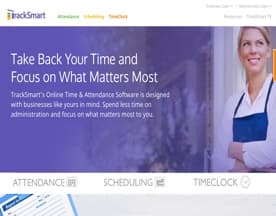
TrackSmart and AttendLab both position scheduling and attendance in close combination, which reduces one of the most common integration headaches: keeping time records aligned with what was actually scheduled versus what was worked.









What a Realistic Rollout Looks Like
A good implementation plan has three stages. First, configure the system to match your existing rules, not the default rules that ship with the software. Second, run a pilot with one team or location before going org-wide. Third, train managers before you train employees, because managers are the ones who resolve disputes, approve exceptions, and set the tone for whether staff take the system seriously.
Expect friction in the first payroll cycle after launch. That is normal. What is not normal is friction that persists through the third or fourth cycle. If problems have not resolved by then, they are structural, and you may be looking at a reconfiguration or a replacement.
The buyers who get burned are the ones who skip the pilot, accept default configurations, and launch to the whole organization on a deadline. Slow the rollout down. The time you spend on setup is recovered many times over in payroll accuracy and manager hours saved.


