


You sat down, picked a tool, filled in the sections, and exported a polished document. Congratulations. You have a business plan. Now ask yourself: does it actually do any work for you beyond that first meeting? Most business plans don't, and most of the software that produces them isn't built to change that. That's not a failure of effort. It's usually a failure of tool selection.
Business plan software covers a wider range of products than most buyers expect when they first go looking. Some tools are document builders that walk you through a structured template. Some are financial modeling environments that happen to produce narrative output. Some are investor-ready presentation platforms. A few are full planning ecosystems with live financial dashboards and scenario modeling. Knowing which type you're buying before you buy it will save you significant frustration later.
What You Actually Need to Figure Out First
Before comparing any products, get honest about your purpose. A solo founder pitching a seed round has completely different needs from an established operator using a plan for an SBA loan, a franchise owner proving viability to a licensor, or a management team realigning strategy for the next fiscal year. The document they each produce may look similar. The software that serves them well looks very different.
Ask yourself three questions before you open a single product page.
Who is the audience for this plan? Investors, lenders, and internal teams each want different levels of financial detail, different narrative structures, and different formatting. A tool optimized for investor-facing pitch decks may produce output that frustrates a bank's loan officer. Know your primary reader before you lock in a format.
How often will this plan change? If you're writing a one-time document for a specific funding event, a template-driven builder is probably sufficient. If you want a living plan you revisit quarterly, you need something with actual financial integration, not just a Word document in a prettier wrapper.
Who else needs to contribute? A solo founder can use almost anything. A team that needs multiple contributors, comment threads, version control, and role-based access needs a proper collaborative environment. Don't buy a single-player tool for a multiplayer problem.
The Three Types of Tools Worth Understanding
Template-Driven Builders
These are the most common entry point. They guide you through standard sections (executive summary, market analysis, competitive landscape, financial projections) and produce a formatted output. The best of them offer industry-specific templates, coaching prompts, and enough structure to keep first-time planners from getting lost.
BizPlanBuilder® has been in this space for decades, which means its template library reflects a lot of real-world feedback. 123BizPlan takes a more streamlined approach for buyers who want to move quickly without being overwhelmed by options.
The limitation here is also the appeal: structure. If your business model doesn't fit neatly into a conventional template, you'll spend time wrestling with the format rather than sharpening your thinking.
Financial Planning Environments
These tools put numbers first. They're built around financial models, forecasting, and scenario analysis. Narrative sections exist, but the real value is in the ability to model different growth trajectories, stress-test assumptions, and produce financial statements that hold up to scrutiny.
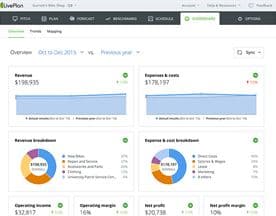
LivePlan sits in this territory, offering financial forecasting alongside plan structure, with the ability to track actual performance against projections over time. That last feature is what separates a financial planning tool from a document generator. If you want to use your plan as a management instrument rather than a filing artifact, that comparison capability matters a great deal.
For organizations operating at larger scale with complex multi-department planning needs, Anaplan represents the enterprise end of the spectrum, where planning connects directly to operational and financial data across the business.
Professional Services Hybrids
Some businesses don't want software at all. They want a finished plan produced by people who know what institutional investors or lenders expect to see. Providers like OGS Capital and Business Planning HQ operate in this space, combining consulting expertise with structured delivery. The output is a document, but the process is closer to hiring a specialist than buying a subscription.
This is a legitimate choice, not a fallback. If your plan needs to survive due diligence from a serious institutional audience, the difference between a template-built plan and one written by people who have been on the other side of that table can be meaningful.
Features That Actually Separate Tools
Financial integration is the single most important differentiator for any plan you intend to use beyond the initial funding conversation. Can the software connect to your actual accounting or operational data? Can it update projections as your numbers come in? Can you run "what if" scenarios without rebuilding the model from scratch?
Collaboration features matter more than most first-time buyers expect. Version history, commenting, and role permissions sound administrative, but they prevent the very real problem of multiple contributors working from different versions of the same document.
Export quality is underrated. A plan that looks professional in the tool but breaks apart in PDF or PowerPoint loses credibility at exactly the wrong moment. Test exports before you commit.
Finally, consider what happens after the plan is done. Palo Alto Software, the company behind LivePlan, has built a library of planning resources and support content alongside their product. Tools backed by genuine planning expertise tend to produce better guided experiences than those built purely around document assembly.
What to Watch Out For
Avoid tools that make the formatting feel like the product. A well-formatted plan with weak financial assumptions does not become a stronger plan because it has a cover page and a color scheme. The software's job is to sharpen your thinking, not to dress it up.
Be skeptical of AI-generated plan content that you haven't verified line by line. Generated text for an executive summary or market analysis can sound authoritative while containing assumptions that don't reflect your actual market. Use AI features as a starting point, not a finished output.
Watch out for annual pricing that locks you into a tool before you've confirmed it fits your workflow. Most reputable products offer a trial period or a short-term plan. Use it.








The Standard That Actually Matters
The real test of business plan software isn't whether the finished document looks impressive. It's whether the process of building the plan forced you to find and fix the weak spots in your thinking before someone else did. A good tool creates enough structure to expose the gaps and enough flexibility to let you work through them. Find that, and you'll have something worth presenting.


